Changelog

What's new in Alien

Deployments

Release channels

Projects now have release channels: named streams of releases, like staging and production, and every deployment follows one. Until now every release went to every deployment; channels let parts of your install base move at different speeds, like an internal staging deployment, a cautious enterprise customer, or a region you roll last:

# CI publishes every build to staging
alien release --channel staging

# When it's proven, promote the exact same artifacts to production
alien releases promote rel_8f3ka92 --channel production

Promotion doesn't rebuild anything, so production runs the exact bytes staging tested. It's also how you roll back: promote an earlier release and the channel's deployments follow. Every project gets a production channel automatically, and alien release with no flags advances it, so if you never think about channels, nothing changes.

Every release also has a detail page now: each deployment classified as updated, updating, failed, pending, or pinned, with rollout durations, failures sorted first, and a live view while the rollout is in flight.

  • Channels are groupings, not environments: staging, regions, one nervous enterprise account
  • Rollback is a promotion: point the channel at an earlier release
  • Nothing hides: pinned and failed deployments stay visible instead of becoming version drift

Read the docs →

Dan LilienblumAlon Gubkin
Dan & Alon
Resources

Versioned KV

KV now supports atomic conditional writes: create a key only if it doesn't exist, or update and delete a key only if it hasn't changed since you read it.

It works through versions. Every read returns the entry's current version. Pass it back as ifVersion and the write only happens if the key is still at that version. Pass ifVersion: null and the write only happens if the key doesn't exist yet:

const jobs = kv("jobs")

// Exactly one worker can create the key
const claimed = await jobs.setJson(jobId, { worker: workerId }, {
  ifVersion: null, // only write if the key doesn't exist
  ttl: 300,
})

if (!claimed) return // another worker already claimed it

When the condition fails, the write returns false instead of throwing. That is all you need for locks, counters, and idempotency keys that stay correct when two workers race.

Under the hood each cloud's native primitive does the work: DynamoDB condition expressions, Firestore preconditions, Azure Table Storage ETags, and an atomic upsert in local dev. Identical semantics everywhere, in TypeScript and Rust.

Read the docs →

Itamar Zand
Itamar
Resources

Storage object metadata

Storage put now accepts object attributes, and get and head return them: content type, cache control, content disposition, custom key-value metadata, plus the provider's ETag and version. No more keeping a file's content type in a separate database next to the file:

const assets = storage("assets")

await assets.put("reports/q1.pdf", pdfBytes, {
  attributes: {
    contentType: "application/pdf",
    cacheControl: "public, max-age=3600",
    metadata: { quarter: "q1" },
  },
})

// Serve it back with the headers it was stored with
const { data, attributes } = await assets.get("reports/q1.pdf")
res.type(attributes.contentType!).send(data)

Reads also return the provider's ETag and version; a head is enough to answer an If-None-Match with a 304 without downloading the object. The same model works on S3, Google Cloud Storage, and Azure Blob, and writes a provider can't honor fail before any bytes land, so an object never exists with silently dropped attributes.

Read the docs →

Dan LilienblumItamar Zand
Dan & Itamar
Resources

AI

Alien now provisions AI inference as a resource. Your product's AI features run on the model service already inside the customer's cloud — Bedrock on AWS, Vertex AI on GCP, AI Foundry on Azure — so the prompts, the data, and the bill all stay with them.

const llm = new alien.AI("assistant").build()

The model is an argument on each request, not a decision in the stack, so one stack file works across three clouds whose model menus differ:

const llm = ai("assistant")

// Model menus differ per cloud, so take one this deployment actually has.
const [model] = await llm.getAvailableModels()

const answer = await llm.chat.completions.create({
  model: model.id,
  messages: [{ role: "user", content: "Summarize this support thread." }],
})
  • Prompts and data never leave their account — inference runs where the workload runs
  • No API keys — calls run under the workload's own cloud identity
  • AWS Bedrock, Google Vertex AI and Azure Foundry — from one line of stack code
  • Claude, GPT, Gemini, Mistral, Qwen, DeepSeek and dozens more — whatever that cloud serves
  • The provider's real API, not a translation layer

That makes AI features shippable into regulated environments: their cloud, their models, their bill.

Some models need a one-time activation in the customer's cloud account before they can be called — Claude on all three clouds.

Read the docs →

Itamar Zand
Itamar
Deployments

Rollout progress

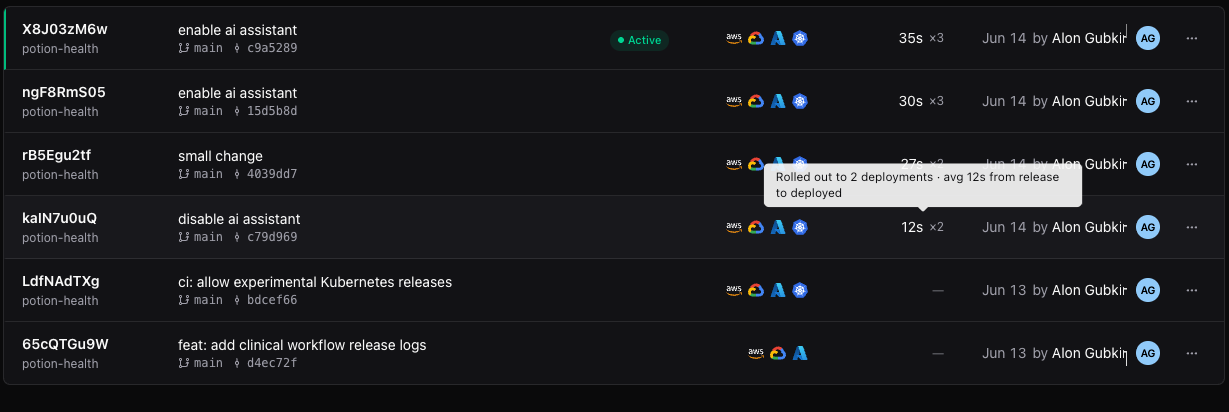
After you publish a release, the question is always the same: is it running everywhere yet? The releases table now answers it at a glance. A release in flight shows live progress — how many deployments have picked it up out of how many. A finished release shows how long the rollout took.

The releases table showing per-release rollout duration and deployment counts, with a tooltip reading "Rolled out to 2 deployments · avg 12s from release to deployed"

The number next to each release is the average time from publishing the release to it running in a deployment, with the count of deployments it reached. Each deployment's timeline also shows its own number — "Release updated · 4m 32s after release" — so a straggler stands out immediately.

Failed rollouts got the same attention. A deployment that failed mid-rollout no longer needs special-case surgery: fix the problem, release again, and it converges through the same desired-state reconciliation as everything else. Auto-updating and pinned deployments both find their way back on their own.

  • Live progress — see a release land deployment by deployment
  • Time to deploy — per-release average and per-deployment timing
  • Recovery is just another release — failed rollouts converge, no manual repair path

Read the docs →

Alon Gubkin
Alon
Reliability

Offline-first

Software you deploy with Alien no longer depends on Alien being up.

Every machine in a deployment now keeps the last accepted deployment plan and supervises it locally. If the control plane becomes unreachable — our outage, their network partition, an air-gap window — nothing changes for the workloads. They keep serving. They keep restarting on failure. A machine can reboot during the outage and come back with its workloads running, restored entirely from the local plan.

Stateful workloads are handled with more care: rather than guessing during a partition, they hold further changes until the control plane is back and fresh authority is confirmed — no split-brain, no double-writes.

Operators aren't blind in the meantime. A local status command inspects what's actually running on a machine, read-only and offline. And the dashboard now separates "we can't reach this machine" from "this workload is down", so a management-plane gap doesn't page anyone about healthy software.

When connectivity returns, machines report what happened and reconcile back to the desired state.

  • Workloads survive outages — serving, restarts, and recovery continue with no control plane
  • Reboot-safe — machines restore their full workload set from the locally cached plan
  • No split-brain — stateful workloads wait for fresh authority instead of guessing
  • Honest status — management reachability and workload health are reported separately

If you sell software that runs in your customer's environment, this is the guarantee they ask about: your vendor's control plane is not in their critical path.

Read the docs →

Alon Gubkin
Alon
Teams

Team invitations

You can now bring your team into a workspace two ways: invite someone directly by email, or share an invite link.

An email invitation waits for its recipient — whether they already have an account or sign up later, they land in the right workspace with the right role on their first login. Pending invitations show up in a dedicated tab on the members table, where you can resend, copy, or revoke them.

For onboarding several people at once, generate an invite link instead: pick a role, share the link, and anyone who opens it can request to join. Links expire, and joins are confirmed by an admin, so a link that leaks doesn't become a backdoor.

Seat limits are enforced at acceptance time, atomically — two people accepting the last seat at the same moment can't both get in.

  • Email invitations — persistent, resendable, revocable, for registered and unregistered recipients
  • Invite links — reusable, role-scoped, expiring, admin-confirmed
  • Seats enforced — acceptance is atomic against your workspace's seat count
Alon Gubkin
Alon
Deployments

Optional resources

Not every customer needs every part of your stack. Resources can now be gated on a boolean deployment input with .enabled(), so the person installing decides what gets provisioned:

const inputs = alien.inputs({
  cacheEnabled: alien.boolean({
    providedBy: "deployer",
    required: true,
    label: "Enable the cache",
    description: "Provision a key-value store for response caching.",
  }),
})

const cache = new alien.Kv("cache")
  .enabled(inputs.cacheEnabled)
  .build()

A disabled resource isn't hidden — it doesn't exist. Nothing is provisioned, no IAM grants are emitted for it, and it's absent from the generated CloudFormation and Terraform. The install a security team reviews contains exactly what that customer turned on.

The gate follows the resource's lifecycle. For frozen resources, the answer is part of the install and fixed for the deployment's lifetime. For live resources, it can change later: enabling provisions the resource, disabling deletes it — data included, deliberately, because that's what "turn this off" means to the person paying for it.

  • Real absence — disabled means no infrastructure, no permissions, no cost
  • Per-customer stacks — one alien.ts, different footprints per deployment
  • Asked like any input — the toggle shows up in the dashboard, portal, CLI, and IaC

Read the docs →

Itamar Zand
Itamar
Resources

Email

Alien now provisions email infrastructure as a resource. Your product can send and receive mail on domains your customer owns, from inside their own cloud account — their sending reputation, their DKIM keys, their data.

const inbound = new alien.Storage("inbound").build()
const events = new alien.Queue("email-events").build()

const email = new alien.Email("email")
  .domains(["mail.acme.com"])
  .inbound(inbound)
  .events(events)
  .build()

Declared domains are verified with DKIM set up automatically. Inbound mail lands in the linked storage bucket, ready for your workload to parse. Delivery, bounce, and complaint events flow into the linked queue, so suppression lists and deliverability monitoring are ordinary queue consumers.

Domains don't have to be fixed at install time. With the email/manage-identities grant, your workload can create and remove domain identities at runtime — the flow a multi-tenant product needs when each of its users brings their own domain.

  • Customer-owned — identities, reputation, and mail live in their account, not a shared sender
  • Send and receive — outbound with email/send, inbound to a bucket you control
  • Runtime domains — add and remove verified domains from your app, not from IaC
  • Event stream — bounces and complaints as queue messages

The Email resource is currently available only on AWS, backed by SES.

Read the docs →

Alon Gubkin
Alon
Compute

Containers without a runtime

Until now, every Container and Daemon ran under a small Alien runtime — a Rust process that started your app, supervised it, and brokered access to bindings and commands. That layer is gone. Your entrypoint is now PID 1: what runs in the customer's cloud is exactly what's in your Dockerfile, with nothing in front of it.

Bindings moved in-process to make that possible. Instead of talking to the runtime, your app imports a library, resolves a resource once, and calls it:

import { kv, queue, container } from "@alienplatform/bindings"

const index = kv("index")
const jobs = queue("jobs")

await index.setJson("user:42", { plan: "pro" })
await jobs.send({ type: "welcome-email", userId: 42 })

const db = container("postgres")
const url = await db.getInternalUrl()

The library is a native binding over the same Rust core on every language, so behavior is identical across Node, Bun, and Rust. Credentials are minted short-lived and refreshed behind the handle — nothing long-lived sits in your environment.

Commands got the same treatment. A container registers named handlers, with optional schema validation using any Standard Schema library (Zod, Valibot, ArkType), and your control plane invokes them without any inbound port:

import { createCommandReceiver } from "@alienplatform/commands"
import * as z from "zod"

const receiver = createCommandReceiver()

receiver.command("reindex", z.object({ tenant: z.string() }), async input => {
  return { started: true, tenant: input.tenant }
})

await receiver.run()

Validated commands infer their input types; handleRaw is there when you want the raw payload.

  • No wrapper — your process runs directly, smaller images, one less thing between you and your app
  • In-process bindings — resolve once, call like a library; queue and KV APIs no longer take a name on every call
  • Typed commands — schema-validated input in Rust and TypeScript

Read the docs →

Dan LilienblumAlon Gubkin
Dan & Alon
Compute

Stateful workloads

Containers can now keep state. Give a container persistent storage and each replica gets its own durable volume, mounted where you say:

const db = new alien.Container("db")
  .code({ type: "image", image: "ghcr.io/acme/db:v1" })
  .replicas(3)
  .persistentStorage("20Gi", { mountPath: "/var/lib/data" })
  .port(5432)
  .permissions("execution")
  .build()

Each replica has a stable identity — db-0, db-1, db-2 — and its volume follows that identity. Restarts, upgrades, and machine replacement all reattach the same disk to the same replica. Peers find each other by name, so clustered software that expects stable members just works.

Replicas are placed across availability zones, and each volume is provisioned in the right zone for its replica. Losing a zone loses one member, not the dataset.

This is the capability that databases, queues, and durable-execution engines need — the class of software that previously meant hand-rolled StatefulSets, PVCs, and an operator per product. We've been running a distributed durable-execution engine and a Postgres connection pooler on it in real customer-style deployments: journals survive restarts, in-flight work completes through rolling updates.

  • Durable volumes — EBS and equivalents on each cloud, kept through every kind of replacement
  • Stable ordinals — predictable names for clustering and peer discovery
  • Zone-aware placement — replicas and their disks spread across failure domains

Read the docs →

Alon Gubkin
Alon
Networking

TCP endpoints

Public endpoints now speak raw TCP, not just HTTP. If your product talks the Postgres wire protocol, Redis, MQTT, or anything else over a socket, you can expose it from a customer deployment the same way you expose an API.

const pooler = new alien.Container("pooler")
  .code({ type: "image", image: "ghcr.io/acme/pooler:v1" })
  .port(6432)
  .publicEndpoint("db", 6432, "tcp")
  .permissions("execution")
  .build()

Alien creates the network load balancer, DNS, and TLS inside the customer's cloud, on AWS, GCP, Azure, and plain machines. Clients get one stable address per deployment and connect with their normal drivers — psql, redis-cli, whatever they already use.

The hard part of TCP is deploys. Database connections live for hours, and a rollout that cuts them is an incident. So Alien drains: during a release, each replica is taken out of the load balancer, waits for its open connections to finish, and only then gets replaced.

  • Any protocol — if it runs over TCP, you can expose it
  • Connection draining — rolling updates wait for open connections instead of cutting them
  • Same declaration everywhere — one alien.ts line works on every cloud and locally in alien dev

Read the docs →

Alon Gubkin
Alon
Networking

Public endpoints

Workers, Containers, and Daemons can now expose named HTTPS endpoints, declared in alien.ts next to the resource they serve.

Alien creates the DNS, TLS, and load balancing inside the customer's cloud. The customer's network decides who can reach each endpoint:

  • Behind the customer's VPN, for dashboards and admin tools their employees use
  • Internal only, for APIs that other services in the environment call
  • On the public internet, for webhook receivers and public APIs
const server = new alien.Container("server")
  .code({ type: "image", image: "ghcr.io/acme/server:v1" })
  .port(8080)
  .publicEndpoint("api", 8080, { protocol: "http", hostLabel: "@" })
  .publicEndpoint("app", 8080, {
    protocol: "http",
    hostLabel: "app",
    wildcardSubdomains: true,
  })
  .permissions("execution")
  .build()

Each deployment gets its own domain, and every endpoint becomes a hostname on it. In the example above, api is served at the domain itself, and app also covers *.app.<domain>, so one declaration handles per-customer subdomains. Your control plane reads the resolved URLs from the manager API instead of constructing them.

TLS works per deployment: every deployment runs in a different cloud account, so there is no shared certificate. Alien issues one for each deployment, imports it into the customer's cloud (ACM on AWS, Certificate Manager on GCP, Key Vault on Azure), and renews it automatically. Customers who manage their own certificates can bring their own domain instead; Alien never sees the private key.

Read the docs →

Alon Gubkin
Alon
Compute

Daemons

Daemons let you run a managed process on every machine in a customer deployment.

Use them for the work that should live on the machine: observability collectors, node agents, and host-level control loops.

const agent = new alien.Daemon("agent")
  .code({ type: "image", image: "ghcr.io/acme/agent:v1" })
  .commandsEnabled(true)
  .permissions("execution")
  .build()

You define the daemon in alien.ts and ship it with the rest of your stack. Alien handles placement, release rollouts, rollback, health, logs, deployment inputs, linked resources, and command-receiver configuration.

Daemons are private by default and can expose HTTP endpoints when they need a public surface. For remote commands, the Daemon application starts an explicit receiver from @alienplatform/commands or alien-commands; Alien injects its target identity and credentials, but does not add a runtime or polling sidecar.

Read the docs →

Dan LilienblumItamar Zand
Dan & Itamar
Resources

Postgres

Alien now provisions a managed Postgres database directly in your customer's cloud. Declare it once in alien.ts, and Alien creates and operates it on AWS, GCP, and Azure.

const db = new alien.Postgres("orders")
  .version("17")
  .cpu("2")
  .memory("8Gi")
  .build()

The connection is injected into your workload, and the password never lands in state, logs, or generated infrastructure. Like every Alien resource, it runs the same locally for development and during alien dev.

  • Private by default, with no public IP on any cloud
  • One declaration, provisioned on AWS, GCP, and Azure (and embedded locally)
  • pgvector out of the box for embeddings, semantic search, and RAG
  • In-place day-2 resize of cpu and memory, with your data kept

Read the docs →

Itamar ZandAlon Gubkin
Itamar & Alon
Deployments

Deployment inputs

When your software runs inside your customer's cloud, it needs real values to start: endpoints, connection strings, API keys. Some of them are yours. Some only the customer's admin has.

Deployment inputs let you declare every one of them in alien.ts. Each input says what it is, how it's validated, and who provides it.

const inputs = alien.inputs({
  databaseUrl: alien.string({
    providedBy: "deployer",
    required: true,
    label: "Database URL",
    description: "Postgres connection string inside the customer's network.",
    pattern: "^postgres://",
    env: "DATABASE_URL",
  }),
  controlPlaneApiKey: alien.secret({
    providedBy: "developer",
    required: true,
    label: "Control plane API key",
    description: "Authorizes this deployment with your control plane.",
    env: "CONTROL_PLANE_API_KEY",
  }),
})

The important part is providedBy, which decides who gets asked:

  • developer values are collected on your side, and the customer never sees them.
  • deployer values are asked of the customer's admin at install time, because they're specific to their own environment.

From that one declaration, Alien validates each value and collects it everywhere setup happens: the dashboard, deployment portal, CLI, CloudFormation, Terraform, and Helm. Types cover strings, secrets, numbers, integers, booleans, enums, and lists, and secrets stay masked, encrypted at rest, and out of generated IaC and logs.

Read the docs →

Alon GubkinDan Lilienblum
Alon & Dan
Debugging

Remote debugging

Debug remotely with the new alien debug command. It opens a secure channel into your customer's cloud and lets you run the CLIs you already use against it, so a remote environment behaves like another region in your own.

  • Secure channel into your customer's cloud
  • No open ports or inbound networking
  • Works with aws, gcloud, az, and kubectl
  • Least-privilege management permissions only
  • Optional approvals from the customer's admins

Read the docs →

Itamar ZandAlon Gubkin
Itamar & Alon
Observability

Live log viewer

Alien now collects logs from all your remote BYOC deployments into an object storage bucket you own. Stream them live and search history from the dashboard, the same across AWS, GCP, Azure, and Kubernetes.

The hardest part of BYOC usually isn't the deployment. It's everything after it.

Observability docs →

Dan LilienblumItamar ZandAlon Gubkin
Dan +2
Launch

Introducing the Alien Platform

Today we're launching the Alien Platform: deploy your software into your customers' clouds and operate it from one place, with updates, monitoring, and remote debugging.

You define what runs in a customer's environment once. Alien generates white-labeled deployment options (CloudFormation, Login with Google, Terraform, Helm, bring-your-own Kubernetes, airgapped), installable through a deployment portal on your own domain. Updates roll out to every deployment automatically across AWS, GCP, Azure, and on-prem.

We also raised a $5M seed from Basis Set, Jibe, and angels at OpenAI, Google, and Databricks.

Read the docs →

Alon Gubkin
Alon
Launch

Introducing Alien

We're happy to announce the first version of Alien, an open-source platform for deploying your software into your customers' own environments and keeping it fully managed. Still very early.

The software runs in the customer's environment, so their data stays private, but you keep operating it: deployments, updates, monitoring, and debugging stay centralized. Targets AWS, GCP, and Azure.

Alon Gubkin
Alon