
Bringing the web workflow to bare metal and on-prem
 Alon Gubkin
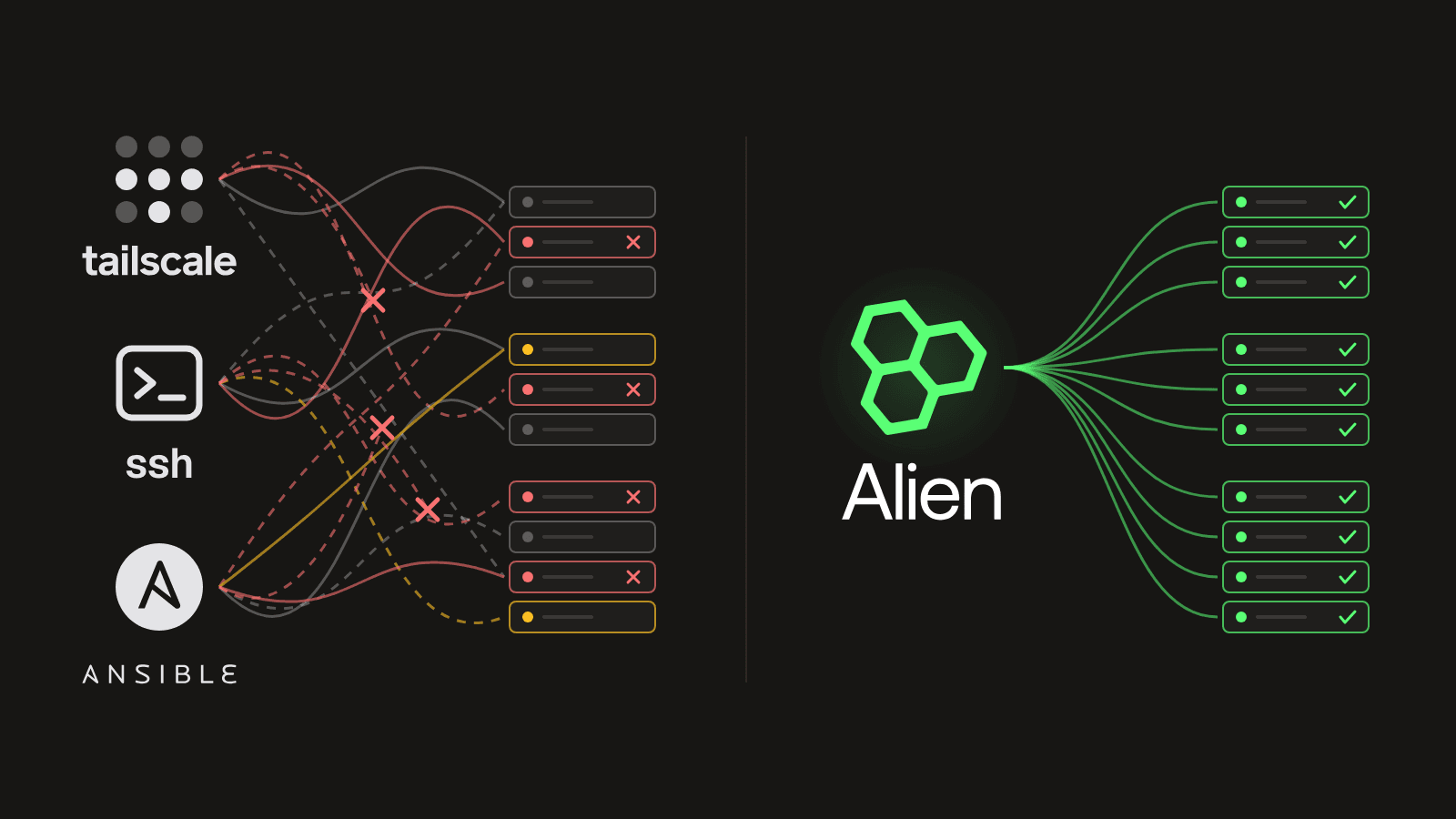
Deploying and operating software on clusters of bare metal and on-prem machines is painful.
Compare that to web development with platforms like Vercel. You (or your agent) push your code, it's live in every region a minute later, you see its logs and health on one page, and rolling back is one button.
With one cluster, it's annoying, but basic CI, Ansible, and Tailscale get you there.
With several clusters, every new cluster adds more of the same work. Say you run your own servers in Frankfurt and Virginia. Each region is its own deploy, with its own host inventory and its own playbook run. A run that fails halfway leaves some machines on the new version and some on the old, and you fix them one by one. Rolling back is the same work, in reverse, under pressure. And to see what's happening, you SSH into machines one at a time.
Then a customer wants your product in their own data center, and it gets much worse. They won't give you SSH. They won't let you install Tailscale or open a VPN into their network. Every update waits for their change window and a call with their IT team. When something breaks, you debug it through screenshots of their terminal. And each new customer is one more environment like that, which you're responsible for but can't reach.
Alien now brings the web workflow to all of those clusters, yours and your customers', with Bare metal & on-prem. You ship a new version with one command, and every machine in every cluster updates on its own. You see the health and logs of every machine in one place. If a version is bad, one command puts every machine back on the one before.
Describe your software once
Everything starts with one file, alien.toml. It says what to run and what each machine needs:
name = "acme-jobs"
platforms = ["machines"]

[pool.workers]
cpu = 2
memory = "4Gi"
machines = { default = 1, allowed = [1, 20] }

[daemon.job-worker]
build = { toolchain = "rust", binary-name = "job-worker" }
pool = "workers"
runtime = { network-mode = "host" }
stop-grace-period = "1h"
health-check = { port = 8080, path = "/healthz" }
This runs a Rust job worker on every machine. Each machine needs 2 CPUs and 4 GiB of memory. When a new version replaces the worker, the old one gets up to an hour to finish the jobs it's running. Alien knows the new one is up when /healthz answers.
The worker runs directly on the machine, on the machine's own network. It can also get the machine's processes and files, for software that needs the host itself, like a hypervisor, a network agent, or a security sensor. See what can run on a machine.
Then ship the first version:
alien releaseThis builds the worker from source and uploads it to Alien as version 1.
Add your own clusters
Create one deployment per cluster:
alien deploy --name frankfurt --machines
alien deploy --name virginia --machines
Each prints an install command for that cluster:
curl -fsSL 'https://pkg.alien.dev/acme/bare-metal-worker/install.sh?version=1.0.0' | sudo bash -s -- join --token 'aj1_…'Run it once on each machine in the cluster. It checks that the machine has what alien.toml asks for, then installs a small background service, the machine agent. The agent connects to Alien, downloads your worker, and starts it.
That's the last time anyone logs into the machine. From then on, the agent keeps it on the latest version you shipped. The deployment is named frankfurt/frankfurt, and the commands below use that name.
Add a customer's data center
For a customer, you don't run anything on their machines. You send them a link:
alien onboard customer-1 --platforms machinesTheir IT admin opens it and lands on a setup page with your name on it. They click Set up machines, copy the install command, and run it on each of their machines. The command installs your own CLI, under a name you choose, like acmectl.
Nothing the customer sees says Alien. The setup page carries your name, logo, and colors. The install command downloads from your own domain. The CLI on their machines is a native binary under your command name, so their admin runs acmectl join and acmectl leave, not an Alien tool. To them, it's part of your product. See Add to your product and Branding.
The admin never gives you SSH keys, VPN access, or a list of hosts. That works because the machine agent opens the connection to Alien, over outbound HTTPS. Alien never connects into the machine, and the customer's firewall already allows outbound HTTPS, so their security team has nothing to open.
Architecture diagram. Alien manages 3 remote environments: Frankfurt (Your bare metal), https 443, outbound; Virginia (Your bare metal), https 443, outbound; Customer 1 (Customer 1's data center), https 443, outbound.
Security
Deploying needs no way in. Every machine connects out to Alien over HTTPS, and Alien never connects back. There's no SSH port, no VPN endpoint, and no management port exposed for anyone to scan or attack. Nobody on your team holds keys to the customer's network, so there are no keys to leak.
Each machine gets its own identity when it installs, and an install command can be revoked at any time.
Your machines connect to Alien's machine service. They do this even when you run a Private Alien Instance in your own AWS, Google Cloud, or Azure account.
Ship a new version everywhere
Change the code and run the same command:
alien releaseAlien builds version 2. Frankfurt, Virginia, and Customer 1 all pick it up. There's no playbook per region and no change window per customer. Each machine agent checks Alien every 5 seconds, then updates its machine:
- It downloads version 2 while version 1 keeps running. If the download fails, version 1 keeps running.
- It tells version 1 to stop. Version 1 stops taking new jobs and finishes the ones it has, for up to an hour.
- Version 2 starts. The agent waits until
/healthzanswers. - Only then does the next machine in the cluster update.
A job that finishes within the hour is never cut short. If version 1 finishes early, the update moves on right away.
We used to babysit Ansible every time we added a server. Now we merge, and a minute later it's live on our bare metal and in our customers' environments.
Tomer Ezer, CTO at Islo
Islo ships to its own bare metal and its customers' data centers this way. Read how Islo does it.
You don't have to update everywhere at once. Point Frankfurt at a staging channel, and the versions you ship there reach only Frankfurt:
alien deployments set-channel <deployment-id> staging
alien release --channel staging
Or keep one customer on a version until their audit ends:
alien deployments pin <deployment-id> <version-id>Roll back everywhere
If version 2 is bad, put version 1 back:
alien releases ls
alien releases promote <version-1-id> --channel production
alien releases ls lists every version you've shipped. Version 1 is already built, so nothing is rebuilt. Every cluster goes back the same careful way it moved forward. With no jobs running, a machine is back on version 1 in about 20 seconds.
See every machine
alien deployments machines frankfurt/frankfurtThis lists every machine in the cluster, with its status, when it last checked in, and which version of the machine agent it runs. The dashboard shows the same, for every cluster, yours and your customers'.
| Status | Meaning |
|---|---|
| Ready | Connected and running your software |
| Unhealthy | Connected, but something is wrong |
| Offline | Hasn't checked in for 5 minutes |
| Draining | Finishing its work before it's taken out |
Read logs
alien logs --deployment frankfurt/frankfurt --followThis streams what your worker prints, from every machine in the cluster. It works the same for a cluster in a customer's data center, behind their firewall. Add --system to see the machine agent's own logs too. See Logs and metrics.
When you need to look at a machine itself, run a command on it from your laptop:
alien debug exec frankfurt/frankfurt --machine <machine-id> -- df -hNo SSH, and no asking a customer to share their screen. See Debug a deployment.
When things go wrong
A machine loses its network. Your software keeps running on the version it had. If it crashes, the agent restarts it. After a reboot, the machine starts that version again. When the network comes back, it catches up.
A machine needs maintenance. Drain it first. It stops taking new jobs and finishes the ones it has before it's taken out:
alien deployments drain-machine frankfurt/frankfurt <machine-id> --deadline 6hAn install command leaks. Each install command carries a token. Revoke it, and nobody can install with it again. Machines that are already installed keep running:
alien deployments join-tokens revoke frankfurt/frankfurt <token-id>The machine agent itself needs an update. It updates itself, one machine at a time. Each machine has to stay healthy for 5 minutes before the next one updates. If a new agent fails to start three times, the machine goes back to the old one. Your software keeps running the whole time.
Domains and HTTPS
If your software serves traffic, each cluster gets its own domain, like api.<cluster-domain>. Alien issues the certificate, renews it, and writes it to a file your software reads. Nobody manages certificates, on your side or the customer's. See Networking.
Why not write your own agent
Teams that outgrow Ansible usually end up writing an agent that pulls new versions. Then everything in this post is theirs to build: replacing a running process without losing its work, health checks, rolling back, logs through a firewall, install tokens, certificates, surviving reboots and outages, and an agent that updates itself safely. It runs as root on machines they can't reach, so its bugs become outages they can't debug.
Alien is that agent and the service behind it, already built.
Try it
The same alien.toml can also deploy into a customer's AWS, Google Cloud, or Azure account. If a customer moves from their own machines to their cloud, you change where it runs, not your software.
The quickstart does all of this on one Linux machine. You install the worker, start a five-minute job, ship a new version while the job runs, and roll back.
More:
- Bare metal & on-prem: the product page
- Bare metal & on-prem docs: workloads, releases, operations, and adding it to your product
- How Islo ships to bare metal and customer clouds
- Changelog